Scaling a PHP application isn’t just about adding servers—it’s about designing systems that can handle high traffic, maintain performance, and scale cost-effectively.
As your user base grows, performance bottlenecks become inevitable. Businesses that proactively invest in scalable architecture—often by partnering with experienced teams via their PHP development services - are far better positioned to handle millions of users without compromising speed or reliability.
Quick Answer
To scale a PHP application for millions of users, implement caching (Redis/OPcache), load balancing, database optimization (read replicas), and cloud-based horizontal scaling. Combining these with asynchronous processing and CDN delivery ensures high performance and availability under heavy traffic.
What is PHP Scalability?
PHP scalability refers to the ability of an application to handle increasing user demand without performance degradation.
A scalable system should:
- Process large volumes of concurrent user requests while maintaining consistent
- response times
- Remain stable during peak traffic conditions without downtime or slowdowns
- Distribute workloads across multiple servers and services efficiently
- Optimize infrastructure costs as the application grows
👉 Businesses planning long-term growth often begin with custom web application development, ensuring scalability is built into the architecture from day one rather than retrofitted later.
Key Challenges in High-Traffic PHP Applications
| Challenge | Real Impact at Scale |
|---|---|
| High concurrent users | Servers struggle to handle simultaneous requests, causing slowdowns or crashes |
| Database bottlenecks | Inefficient queries significantly increase latency |
| Session management issues | Users may experience inconsistent sessions across distributed systems |
| Lack of caching | Repeated processing increases server load unnecessarily |
| Monolithic architecture | Makes it difficult to scale individual components independently |
Stat Insight:
- Poor query optimization can increase response times by 200–500% under heavy load
- Implementing caching can reduce backend load by up to 80%
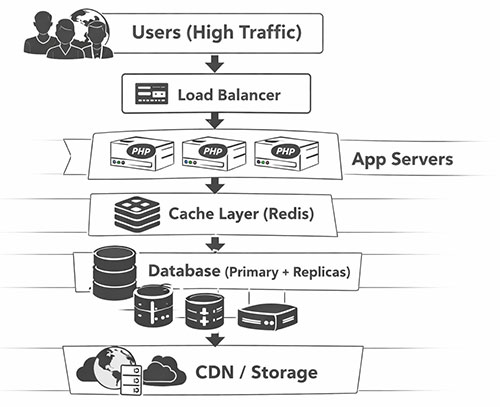
Scalable PHP Architecture
This architecture forms the backbone of high-traffic PHP applications, enabling efficient horizontal scaling.
Horizontal vs Vertical Scaling
| Factor | Vertical Scaling | Horizontal Scaling |
|---|---|---|
| Approach | Increasing server capacity | Adding more servers |
| Scalability | Limited by hardware | Virtually unlimited |
| Cost efficiency | Expensive over time | More optimized |
| Reliability | Lower | Higher |
👉 For businesses planning to scale aggressively, horizontal scaling is essential—and typically implemented as part of enterprise-grade PHP development services.
Proven PHP Scalability Techniques
1. Optimize PHP Code for High Performance
Efficient code is the foundation of scalability.
- Refactoring inefficient logic reduces execution time and improves system efficiency
- Using modern PHP versions (PHP 8+) unlocks significant performance improvements
- Minimizing redundant database queries reduces latency under load
👉 Many businesses choose to hire PHP developers with experience in performance optimization to ensure their applications are built for scale from the beginning.
2. Use a Scalable Framework Like Laravel
Frameworks simplify scaling by providing built-in tools.
- Laravel’s MVC structure improves maintainability and scalability
- Built-in queue systems allow background processing of heavy tasks
- Native caching support reduces repeated processing
3. Implement Multi-Layer Caching
Frameworks simplify scaling by providing built-in tools.
| Cache Type | Impact |
|---|---|
| OPcache | Reduces PHP execution time |
| Redis / Memcached | Enables fast in-memory data retrieval |
| Full-page caching | Reduces backend processing load |
Stat Insight: Applications using Redis often achieve 5–10x performance improvements.
4. Optimize Database Performance
Database scaling is critical for handling millions of users.
- Indexing frequently accessed data improves query speed
- Read replicas distribute load efficiently
- Query optimization reduces unnecessary database stress
👉 This is a key component of scalable PHP application development, especially for SaaS and enterprise platforms.
5. Implement Load Balancing
Load balancing ensures traffic is distributed evenly across servers.
- Prevents server overload during peak traffic
- Improves application uptime and reliability
- Enables seamless horizontal scaling
6. Transition to Microservices Architecture
As applications grow, monolithic structures become limiting.
- Microservices allow independent scaling of components
- Improve deployment speed and flexibility
- Enable better resource utilization
7. Use Asynchronous Processing
Handling heavy tasks in the background improves performance.
- Tasks like email notifications, file processing, and reports can run asynchronously
- Reduces response time for users
8. Use CDN for Faster Content Delivery
CDNs deliver content closer to users, reducing latency.
Stat Insight: CDNs can reduce page load times by up to 50% globally, improving user experience significantly.
9. Leverage Cloud Infrastructure for Auto Scaling
Cloud platforms enable dynamic scaling.
- Automatically adjust resources based on demand
- Reduce infrastructure management overhead
- Ensure high availability
👉 Businesses often combine cloud infrastructure with professional web development services to achieve optimal scalability and performance.
10. Monitor Performance Continuously
Scaling is an ongoing process.
- Monitor response times and server load
- Identify bottlenecks early
- Optimize based on real-time usage patterns
Real-World Case Study: Scaling a PHP SaaS Platform
Scenario: A SaaS platform scaled from 50,000 to over 1 million users within a year.
Challenges faced:
- Frequent downtime during peak traffic
- Slow database performance
- Increasing latency
Solution implemented:
- Introduced Redis caching
- Implemented load balancing
- Added database read replicas
- Migrated to cloud infrastructure
Results achieved:
- 65% improvement in response time
- 80% reduction in database load
- Near-zero downtime
👉 This demonstrates how the right strategy—and the right development partner through PHP development services - can transform scalability outcomes.
Recommended Tech Stack
| Layer | Tools |
|---|---|
| Backend | PHP 8+, Laravel |
| Caching | Redis, Memcached |
| Database | MySQL with replication |
| Queue | RabbitMQ / SQS |
| Cloud | AWS / Azure |
| CDN | Cloudflare |
Common PHP Scaling Mistakes to Avoid
Scaling issues are often not caused by PHP itself, but by avoidable architectural and planning mistakes. Below are some of the most common pitfalls businesses face:
1. Ignoring Caching Until Performance Issues Appear
Many teams delay implementing caching until the application starts slowing down. By that time, performance issues have already impacted user experience.
A better approach is to design caching layers (OPcache, Redis) early, so repeated database queries and computations are minimized from the start.
2. Relying on a Single Database Instance
A single database may work initially, but as traffic grows, it quickly becomes a bottleneck.
Without read replicas or database clustering:
- Query response times increase
- Server load spikes
- System stability decreases
👉 Implementing read/write separation and replication early prevents major scaling issues later.
3. Poor Session Management in Distributed Systems
Storing sessions locally on a single server creates inconsistencies when multiple servers are introduced. Users may:
- Get logged out unexpectedly
- Experience broken sessions
👉 Using centralized session storage (like Redis or database-backed sessions) ensures consistent user experience across servers.
4. Skipping Load Testing Before Scaling
Many applications are deployed without being tested under real-world traffic conditions.
This leads to:
- Unexpected crashes during peak traffic
- Poor performance under load
👉 Regular load and stress testing helps identify bottlenecks before they affect real users.
5. Overengineering Too Early
Some teams jump into microservices or complex distributed systems before their application actually needs it.
This results in:
- Increased development complexity
- Higher maintenance costs
- Slower development cycles
👉 Start simple and scale architecture progressively based on actual demand.
6. Ignoring Monitoring and Observability
Without proper monitoring, teams operate blindly. Issues go unnoticed until they become critical.
👉 Implementing monitoring tools helps track:
- Server performance
- Error rates
- Traffic patterns
This enables proactive optimization instead of reactive firefighting.
7. Not Optimizing Database Queries
Even with powerful infrastructure, poorly written queries can cripple performance.
👉 Common issues include:
- Missing indexes
- N+1 query problems
- Unoptimized joins
Fixing these can lead to massive performance improvements without additional infrastructure cost.
Final Thoughts
Scaling PHP applications to millions of users requires a strategic combination of architecture, performance optimization, and infrastructure planning.
Businesses that invest early in scalability are better equipped to:
- Deliver consistent user experiences
- Handle rapid growth without failures
- Optimize long-term operational costs
👉 If you're planning to scale your application, you can:
- Explore our PHP development services page for scalable solutions
- Hire PHP developers experienced in high-traffic systems
FAQs
Yes, PHP can handle millions of users when combined with the right architecture. Large-scale platforms rely on caching layers, load balancing, database optimization, and cloud infrastructure to ensure consistent performance. PHP itself is not the limitation—architecture is.
The most critical techniques include:
- Implementing caching (Redis, OPcache) to reduce server load
- Optimizing database performance using indexing and replication
- Distributing traffic using load balancers
- Using asynchronous processing for background tasks
These collectively ensure that the application can handle high traffic efficiently.
Handling high traffic requires a combination of strategies:
- Horizontal scaling with multiple servers
- CDN usage for static content delivery
- Efficient database management
- Real-time performance monitoring
This ensures the system remains stable even during traffic spikes or peak usage periods.
In most cases, the database becomes the primary bottleneck. As traffic increases:
- Queries become slower
- Response times increase
- Server load spikes
👉 Proper database optimization and scaling strategies are essential to maintain performance.
Yes, Laravel is widely used for scalable applications. It provides built-in support for:
- Caching
- Queues
- Task scheduling
With proper architecture, Laravel can power high-traffic and enterprise-grade applications.
You should consider microservices when:
- Your application becomes large and complex
- Different modules require independent scaling
- Deployment cycles slow down due to tight coupling
However, it’s important to transition gradually and only when scaling demands it.
Caching reduces the need to repeatedly process the same data or queries.
For example:
- Frequently accessed data is stored in memory
- Database queries are minimized
- Response times improve significantly
👉 This can lead to 5–10x performance gains in high-traffic applications.
Yes, but in a balanced way. While small applications don’t need complex architectures, they should:
- Follow clean coding practices
- Use scalable frameworks
- Avoid decisions that limit future growth
This ensures the application can scale smoothly when needed.